Manage offers
The Offers page lists every offer with its reward, minimum spend and status.
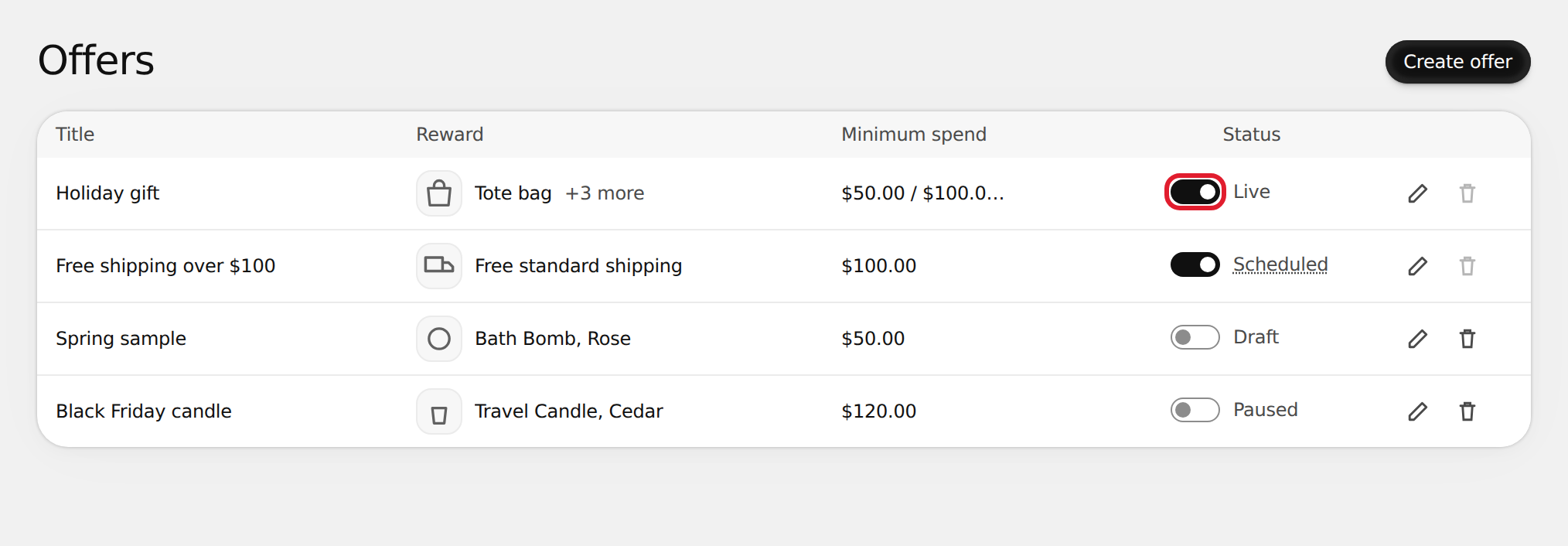
Turn an offer on or off
Use the switch in the Status column.
- On activates the offer. If another offer with the same reward is active, you're asked to pause it first.
- Off pauses the offer. Shoppers stop seeing it and the discount no longer applies at checkout. The offer keeps its settings, so you can turn it back on later.
Statuses
| Status | Meaning |
|---|---|
| Draft | Saved but never activated. Not on your store. |
| Scheduled | Active, waiting for its start time. |
| Live | Active and showing on your store. |
| Ended | Active, but its end time has passed. Pause it to free its slot for another offer. |
| Paused | Turned off. Not on your store. |
Edit an offer
Select the pencil icon (Edit offer), make your changes and select Save. Changes to an active offer update the storefront and checkout right away.
Delete an offer
- Pause the offer first. You can't delete an active offer.
- Select the trash icon (Delete offer) and confirm with Delete.
warning
Deleting can't be undone. Shoppers won't see the offer again.
The list shows 25 offers at a time. Select Load more to see the rest.